

November 9, 2026

The Google Play Developer Console — today’s Google Play Console — is a large platform, and most developers use a fraction of it. This is the definitive section-by-section reference: what every area does, where the important controls hide, and which pages deserve a place in your weekly routine. Bookmark this one.
In short: Google Play Console organises app publishing into clear sections — Test and release for tracks and rollouts, Monitor and improve for vitals and reviews, Grow for store listings, plus Policy, Monetize and Setup. Master the release pipeline, staged rollouts, vitals and living policy declarations, and check the console daily during rollouts, weekly for reviews and monthly for policy.
play.google.com/console opens on All apps: every app under your account with status at a glance. Click through to an app’s dedicated dashboard, organized into pillars. Learn the map once and you’ll navigate entirely by muscle memory.
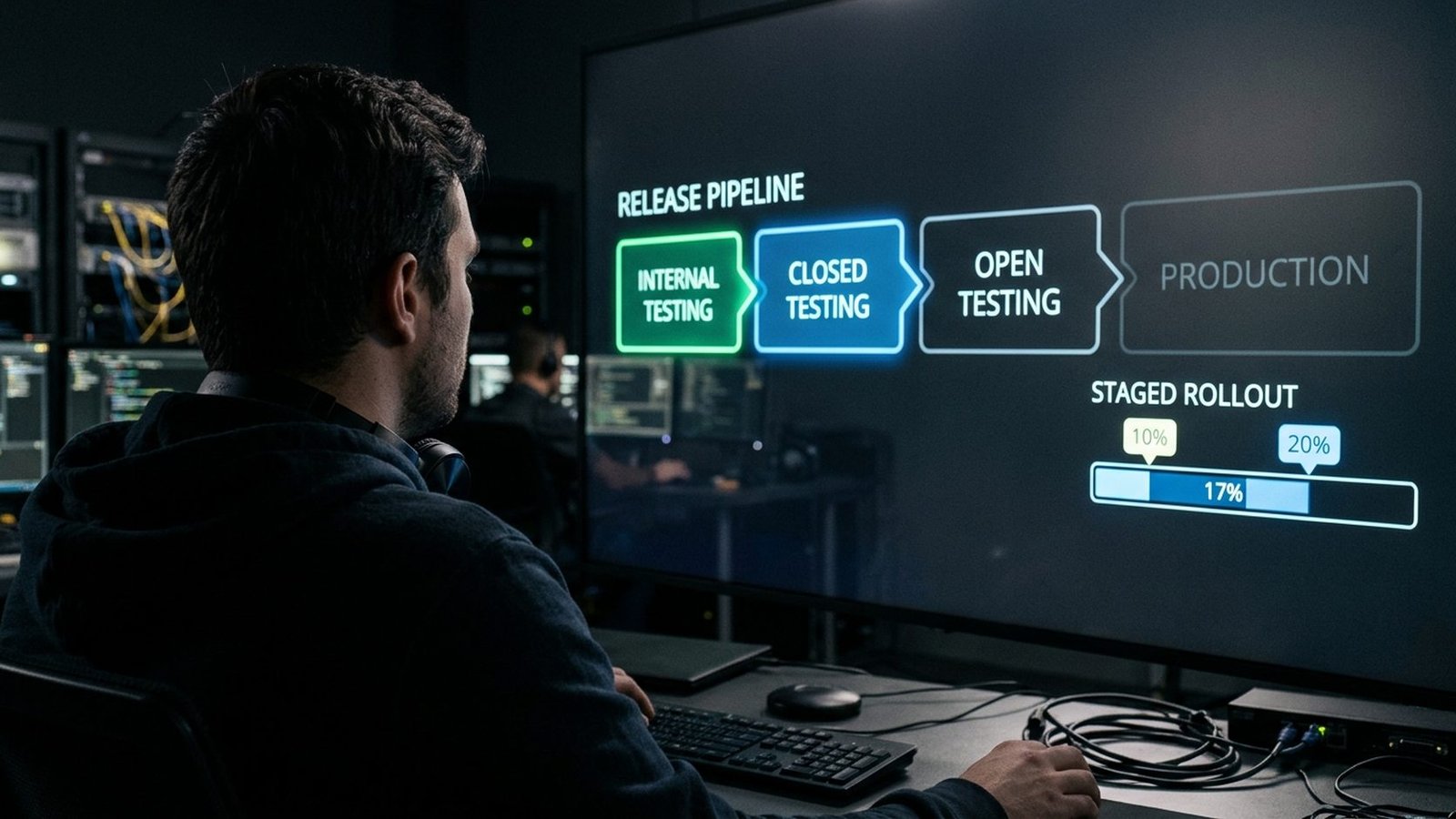
Test and release is your deployment pipeline:
Promote builds upward through the tracks. Every production release should have survived the lower tracks first.
Publishing overview shows everything in review, approved, or blocked — your single source of truth during launches. Enable managed publishing to hold approved changes until you explicitly publish, coordinating releases with marketing instead of hoping review timing cooperates.
Upload Android App Bundles (.aab) — required for new apps. Enroll in Play App Signing (Setup → App signing) so Google safeguards your signing key. Key loss without enrollment is effectively unrecoverable.
The table below summarises the release tracks:
| Track | Details |
|---|---|
| Internal testing | Up to 100 testers, fastest distribution — daily builds live here |
| Closed testing | Email-list or Google Group testers; new personal accounts satisfy the 14-day / 12-tester production requirement here |
| Open testing | Public opt-in link for beta at scale |
| Production | The public store, shipped via staged rollouts (start 10–20%, monitor, ramp) |
Quality → Android vitals: crash rate, ANR rate, excessive wakeups vs. Google’s bad-behavior thresholds. Exceed them and discoverability drops. Check after every release; alert on deltas from your baseline, not just Google’s lines.
Read, filter, and reply to reviews — publicly and specifically. Set up notifications so 1-star reviews never sit for weeks. The Reviews analysis tab mines trending topics from feedback: free product research.
Monitor → Statistics: installs, uninstalls, ratings, revenue by country, device, version, and channel. Twenty minutes here before roadmap planning beats a week of debate.
Grow → Store presence → Main store listing: name, descriptions, graphics, category, contact details. Treat it as a living product surface:
Our store presence guide goes deep on listing optimization.
Policy → App content: data safety form, content rating, target audience, privacy policy — living documents to update the same day your app’s behavior changes. Policy status: check monthly for warnings before they escalate. Understand the ladder: rejection → removal → suspension (strike) → termination of the whole account.
Monetize: in-app products, subscriptions, and pricing. Remember: paid apps can’t go free later. Setup: app signing, API access (link a Cloud project and service account for CI/CD automation), and Users and permissions — least-privilege roles, reviewed quarterly. Our dev console automation guide covers the API in depth.
Setup → Payments settings: tax forms, payout details, thresholds. Complete tax documentation before your first earnings month — payouts can’t flow without it.
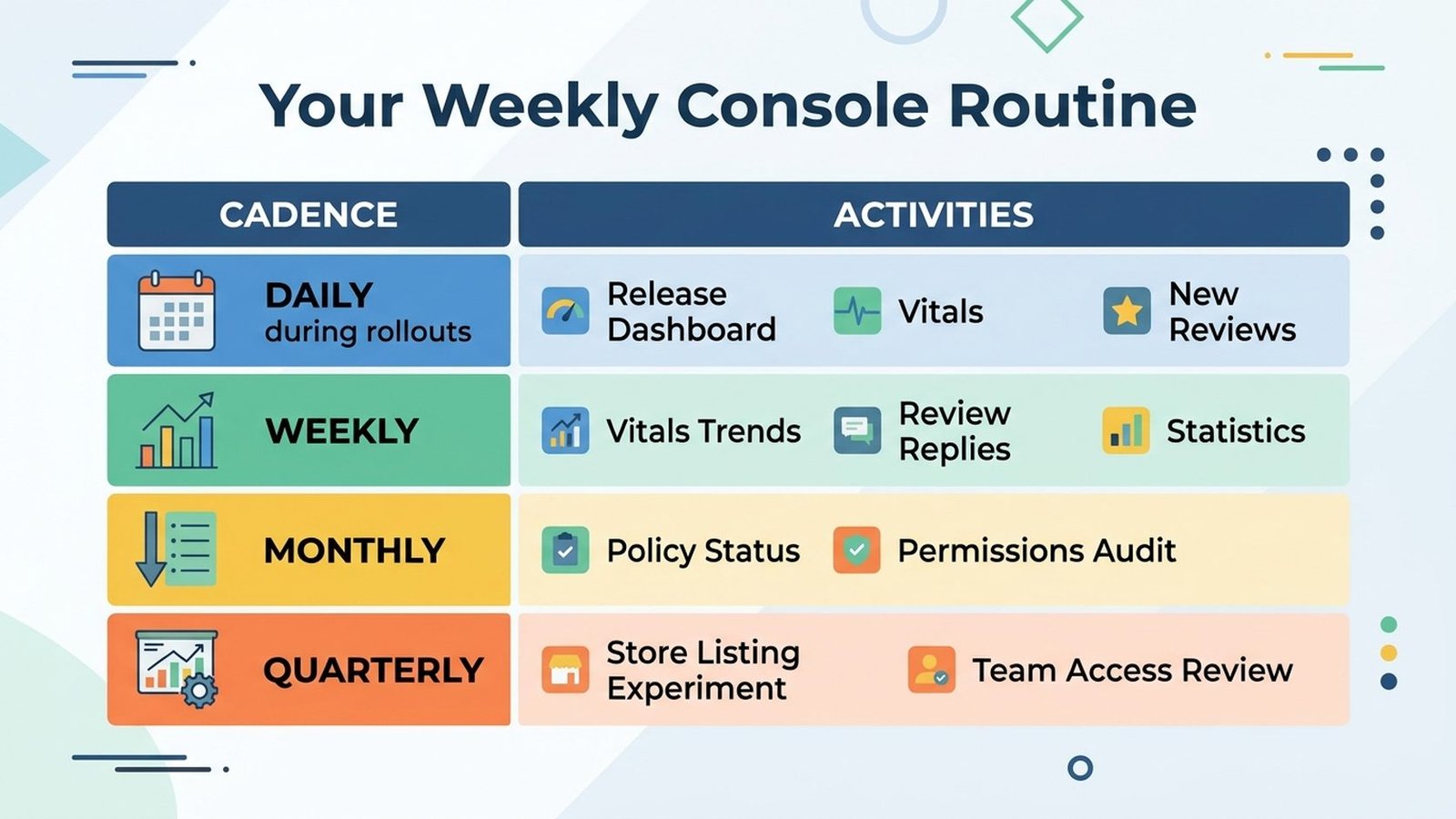
The table below summarises that routine:
| Cadence | What to check |
|---|---|
| Daily during rollouts | Release dashboard, vitals, new reviews |
| Weekly | Vitals trends, review replies, statistics snapshot |
| Monthly | Policy status, user permissions audit, SDK/data-collection review |
| Quarterly | Store listing experiment, team access review, declaration accuracy audit |
Beyond the headline sections, the developer console hides genuinely useful capabilities:
Every change ever made to your store presence and releases is logged with timestamps and authors. When something breaks and nobody admits to touching it, the change history tells the truth. Invaluable during incident reviews.
Release → Device catalog shows exactly which devices your app supports or excludes, with per-device install data. Before blaming “the algorithm” for low installs, check whether your manifest accidentally excludes entire device families — a misconfigured <uses-feature> has silently killed more launches than any policy.
If your app has a login wall, provide demo credentials under Policy → App content → App access. Reviewers can’t evaluate what they can’t open, and “couldn’t access the app” rejections are entirely self-inflicted. Update these credentials whenever your demo account changes.
Grow → Play Points and promotional tools (promo codes, pre-registration campaigns) let you run launch campaigns natively. Pre-registration is particularly powerful: build a coming-soon page weeks before launch, collect pre-registrations, and convert them to installs on day one with auto-install. Launch-day velocity meaningfully affects early ranking.
The console offers machine translation for store listings directly in the dashboard. It’s a starting point, not a finish line — always have a native speaker review before publishing. But for testing whether a market responds before investing in professional localization, it’s perfect.
Download reports under financial reports gives you granular sales data for your own analysis. Reconcile these against your payments profile monthly — discrepancies caught early are accounting fixes; caught late, they’re tax problems.
Google documents all of these in the Play Console Help Center — the search function there is better than most developers assume.
At portfolio scale, chaos comes from naming, not tooling. Conventions that keep multi-app accounts manageable:
Name every release descriptively: 2.4.1-hotfix-login-crash beats Release 47. Future-you, debugging at midnight, will be grateful. Include the ticket or issue reference when your team uses one.
Closed testing lists rot: people leave companies, email addresses die, and your “12 testers” quietly becomes 7 active ones. Audit tester lists quarterly — remove bounced addresses, confirm the list still meets the 12-tester minimum for any compliance-sensitive tracks, and refresh your beta community annually with an open call.
For each app, maintain a one-page runbook: signing configuration, track strategy, rollout percentages, key contacts, known policy sensitivities (e.g., “this app handles health data — data safety form section 3 needs review on every SDK update”), and the rollback plan. When someone new joins or you’re on vacation, this page is the difference between a handled incident and a crisis.
Unpublish dead experiments rather than leaving them to rot publicly — a developer page full of abandoned apps with 2.1-star ratings drags down your brand. But don’t delete apps with active users without a migration plan; unpublishing removes them from sale while existing users keep access, which is usually the right middle ground. Review your portfolio annually with fresh eyes: would you proudly show this developer page to a prospective client or employer today? If the answer is no, you already know which apps to unpublish and which listings to refresh — schedule it for this week, not “someday.”
play.google.com/console — sign in with the Google account that owns your developer registration.
$25 one-time per developer account. The dashboard, API, testing tracks, and unlimited apps are all included.
Internal (fast, 100 testers), closed (named beta testers), open (public beta link), production (public store). Use them as a pipeline: internal → closed → open → production.
Publishing overview shows every change in review, approved, or blocked, with estimated timelines.
Largely yes via the Google Play Developer API: uploads, track management, staged rollouts, review replies. Policy declarations stay manual by design.
Read the enforcement email carefully, fix the root cause across the entire app (not just the flagged screen), update related declarations, and appeal through Play Console with a factual account of what changed. Don’t resubmit the same build.
The Google Play Developer Console is deep, but the 20% that matters is: tracks as a pipeline, staged rollouts with halts, vitals as SLIs, living policy declarations, and an iterated store presence. Master those and the rest is reference material.
One final habit that separates professionals: teach the console to someone else on your team. The act of explaining release tracks, staged rollouts, and policy declarations forces you to confront the gaps in your own understanding — and it means your publishing operation survives vacations, departures, and 2 AM incidents. Document your team’s specific conventions (track strategy, rollout percentages, halt criteria, review reply voice) in a runbook next to the technical docs. The console gives you the tools; the runbook makes them a system.
For help with setup, verification, testing, or compliance, Play Console Store is an independent marketplace built for Android publishing operations. See our Google Play services and the Google Play Console complete guide to go further.