

November 29, 2026

For Google Play Console Android developers who ship frequently, the web dashboard is only half the platform. The other half is programmatic: the Play Developer API for automating uploads and releases, the reporting APIs for pulling financial and review data into your own systems, and the CI/CD patterns that turn publishing from a manual ceremony into a pipeline. This is the technical guide — aimed at developers comfortable with APIs, service accounts, and build scripts.
In short: the Play Developer API lets Android teams automate bundle uploads, track promotions, staged rollouts, and review and financial reporting through OAuth2 service accounts. Automate the mechanics, keep humans on production approvals and policy declarations, and scope every service account to the smallest role it needs.
| Play Console (web) | Play Developer API | |
|---|---|---|
| What | Human dashboard | REST API for automation |
| Best for | One-off tasks, review, admin | Repetitive, high-frequency operations |
| Auth | Google sign-in + 2SV | OAuth2 service accounts |
| Setup | None | Cloud project + service account + key |
| Scope | Everything | Publishing-focused subset |
The rule of thumb: if a human does it weekly, automate it; if monthly, the dashboard is fine. Teams shipping weekly or faster should be API-driven for uploads and rollouts while keeping the dashboard for review and admin.
Setup → API access in Play Console:
Security non-negotiables: rotate keys quarterly, scope service accounts minimally (a pipeline uploading to internal testing doesn’t need production rights), and monitor API usage for anomalies. Leaked Play API keys have caused real unauthorized releases. Google’s official API documentation is the reference for every endpoint.
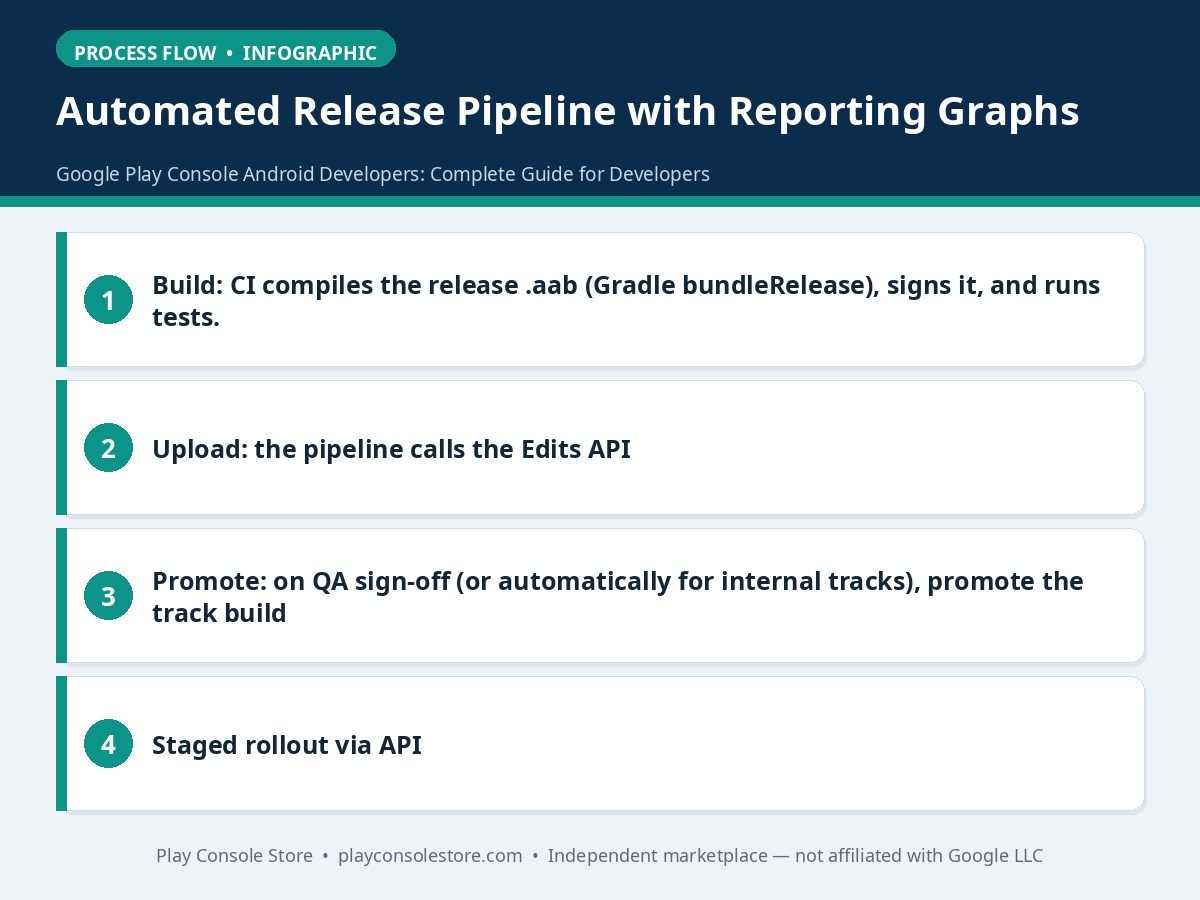
The canonical CI/CD flow for Android teams:
What to automate first (ROI order): internal-track uploads (daily value) → closed-track promotion → staged rollout stepping → release-notes publishing. Leave the decision to ship in human hands; automate the mechanics.
Beyond publishing, Google offers programmatic access to your console data:
Practical pattern: a nightly job pulls reviews + vitals into your team’s Slack channel. The whole team sees user sentiment and stability every morning without opening the console — awareness without effort.
Well-supported: bundle/APK uploads, track assignments and releases, staged rollout percentages, release notes, in-app product management, subscription configuration, review listing and replies, store listing edits (text).
Limited or absent: policy declarations (data safety forms remain manual — deliberately, since they carry legal weight), account-level admin (users, payments, tax), and anything requiring human judgment in review. Google keeps compliance and money human-gated; automate around them, not through them.
Quotas and reliability: the API has per-project quotas sufficient for normal CI/CD. If you hit limits, you’re almost certainly polling too aggressively — use webhooks/push where available and cache aggressively.
The table below summarises what the API can and cannot do:
| Support level | Capabilities |
|---|---|
| Well-supported | Bundle/APK uploads, track assignments and releases, staged rollout percentages, release notes, in-app product management, subscription configuration, review listing and replies, store listing edits (text) |
| Limited or absent | Policy declarations (data safety forms remain manual), account-level admin (users, payments, tax), and anything requiring human judgment in review |
The indie solo dev: Gradle Play Publisher → internal track on every merge to main. Manual promotion to production weekly. 30 minutes of setup, hours saved monthly.
The growing team: CI uploads to internal; QA promotes to closed via a Slack bot command; staged production rollouts step automatically with vitals gates; release notes generated from the changelog. Humans approve the production step; everything else flows.
The studio with 20 apps: one service account per app group, a central release dashboard aggregating all tracks and vitals, automated halt on bad-behavior threshold breaches. At this scale, the API isn’t convenience — it’s the only sane way to operate.
Pair the automation with the operational discipline in our release management guide.
Version your automation. Pin plugin versions, lock API client libraries, and test pipeline changes on a dummy app before pointing them at production tracks. A broken pipeline at 11 PM before launch is worse than no pipeline — treat your release automation with the same rigor as the app it ships.
The highest-value first automation for most teams isn’t publishing — it’s monitoring. A nightly job that: (1) pulls crash/ANR rates per app via the API, (2) fetches new reviews and flags 1–2 star ones, (3) checks for policy inbox messages, and (4) posts a digest to Slack. Implementation is straightforward: a scheduled Cloud Function or GitHub Action, service-account auth, and a few API calls. The pattern generalizes — once the plumbing exists, adding ‘auto-halt rollout if crash rate doubles’ is a small step. Start with read-only automation (monitoring, reporting) before write automation (releases, rollouts); the blast radius of a monitoring bug is an annoying Slack message, while a release-automation bug ships to users.
Measure the payoff. Track two numbers before and after automating: hours spent on releases per week, and incidents caused by manual steps. Most teams find the API integration pays for itself within a month — and the incident count is the number that convinces skeptical leads.
A REST API for programmatically managing Play Console publishing: uploading bundles, creating releases, managing tracks and staged rollouts, handling in-app products and subscriptions, and working with reviews. Authenticated via OAuth2 service accounts configured at Setup → API access.
No — the web console covers everything for infrequent publishers. The API pays off when you ship weekly or faster, run many apps, or need console data (reviews, financials) inside your own systems.
Yes — API usage itself is free within quotas. You still need the $25 developer account, and the usual service fees apply to revenue. Costs are in engineering time to build the integration.
No — data safety forms, content rating questionnaires, and similar declarations remain manual. Google deliberately keeps compliance attestations human-gated.
The open-source Gradle Play Publisher plugin: a few lines in your build.gradle wire bundleRelease output straight to a Play track from CI. It’s the standard starting point before writing raw API calls.
For Android developers who ship seriously, Play Console is two tools: the dashboard for judgment and the API for repetition. Set up service accounts with least privilege, automate the upload-promote-rollout pipeline, pull reviews and financials into your own systems, and keep humans on the decisions that matter — declarations, production approvals, and policy. The teams that do this don’t just ship faster; they ship calmer.
Play Console Store is an independent marketplace helping Android developers with Play Console setup, CI/CD publishing workflows, and technical operations. Automate your publishing.