

November 19, 2026

Your app’s rating is part of your store listing — users see it before your screenshots — and in the developer Play Store console, reviews are a growth lever most developers underuse. The data is clear: developers who reply to reviews see higher update rates from reviewers, and apps that climb from 3.8★ to 4.3★ see meaningful conversion lifts. Meanwhile, unanswered 1-star reviews compound, fake reviews go unchallenged, and feature requests in reviews never reach the roadmap.
In short: Reviews in the developer Play Store console are a growth channel, not a chore. Reply to one-to-three-star reviews first with specifics, ownership, and a concrete next step, thank positive reviewers briefly, report fake or abusive reviews, and use the In-App Review API to grow legitimate rating volume.
This guide covers review management end to end: the console’s review tools, reply strategies that actually change ratings, recovering from review bombs, handling fake and abusive reviews, and turning review text into product intelligence. For listing optimization around your rating, see our Play Store listing guide.
Console path: Select app → Ratings and reviews (left nav).
What you get:
The metric to watch: rating trend by app version. A new version that drops your average from 4.4 to 4.0 is a regression signal as real as a crash spike — investigate immediately.
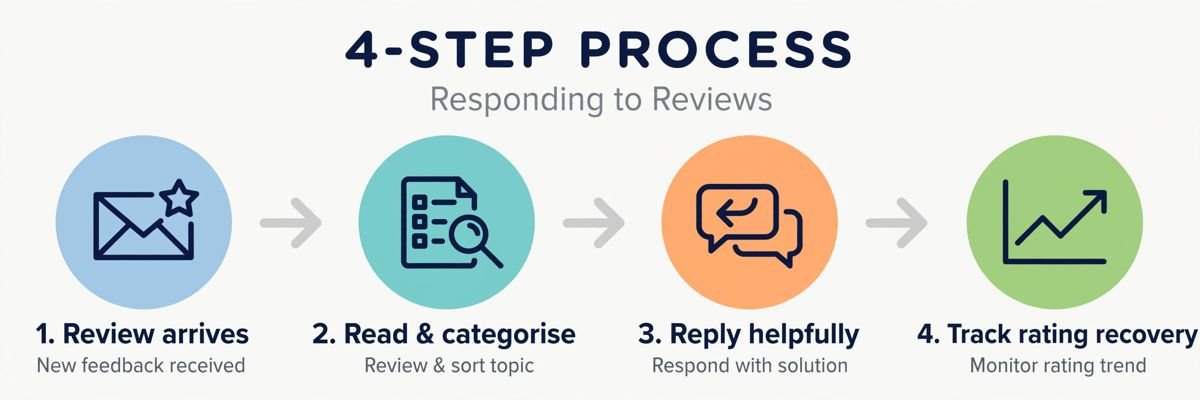
Prioritize 1–3 star reviews, newest first. A thoughtful reply does three things: it can convert the reviewer (many users update their rating after a good support interaction), it shows prospective users you care, and it gives you diagnostic information.
The reply formula:
Example: “You’re right — v2.4 crashes on Pixel 6 during sync. We’ve reproduced it and the fix ships in v2.4.1 this week. If you’d like early access to the fixed build, email support@fittrack.app — Alex.”
A short thank-you on positive reviews builds loyalty and costs seconds. For detailed positive reviews mentioning specific features, reply with what’s coming next in that area — it turns fans into evangelists.
The table below summarises the reply priorities:
| Priority | Reviews to handle |
|---|---|
| First | 1-star reviews, newest first — never leave 1-star reviews unanswered |
| Next | 2–3 star reviews, newest first |
| Then | Version-specific complaints |
| Then | Everything else, including short thank-yous on 4–5 star reviews |
Diagnose first: check ratings by version and date. Common causes:
Recovery playbook:
The table below summarises the common causes of rating drops and the responses:
| Cause | How it shows up | Response |
|---|---|---|
| Buggy release | Rating drops aligned with a version | Halt the rollout, fix, and reply to affected reviews mentioning the fix version |
| Policy or pricing change | Users review-bomb paywalls and permission requests | Reply calmly explaining why if the change is legitimate; revert fast and say so publicly if it’s a mistake |
| Coordinated attack | Sudden flood of similar 1-star reviews from new accounts | Report as spam and don’t engage individually |
| External event | A viral tweet or influencer complaint | Ride it out with professional replies; the spike decays |
Console path: Reviews inbox → ⋮ menu on a review → Report.
Report reviews that are: spam or fake, off-topic (reviewing the phone, not your app), abusive/hateful, or conflicts of interest (competitor sabotage). Google’s moderation typically acts within days on clear-cut cases.
What reporting won’t fix: legitimate negative reviews you disagree with. “This review is unfair” isn’t a policy violation — reply professionally instead. And never threaten reviewers or demand removal; that behavior itself can be reported against you.
Competitor sabotage (suspicious bursts of 1★ reviews with no substance): document the pattern, report in bulk, and note it in your appeal if ratings affect a program eligibility. Google’s fraud systems do detect and purge these, though not instantly.
Reviews are free user research — mine them:
Feed this into a monthly review insights report for your team: top themes, rating trend, reply SLA compliance, and actions taken. Teams that do this ship what users actually want.
Google’s review policies and reply guidelines are in the Play Console Help Center.
At high review volumes, manual replies don’t scale — that’s what the Reply to Reviews API (part of the Google Play Developer API) is for:
Automation rules: never auto-send replies without human review — a botched automated reply (“Thanks for your feedback!” on a data-loss report) is worse than silence. Automate the routing and drafting; keep humans on the send button. Our team permissions guide covers setting up the API service accounts this requires.
In the developer Play Store console, reviews are a growth channel: answer negatives with specifics and ownership, thank positives briefly, report genuine abuse, and mine review text for your roadmap. Use the In-App Review API to keep legitimate volume healthy. Teams that reply thoughtfully watch ratings climb; teams that stay silent watch them decay.
Prioritize 1–3 star reviews (newest first), then detailed positives. Replying to everything is ideal but impractical at scale — use the console’s filters and, at high volume, the Replies API integrated with your helpdesk. Never leave 1★ reviews unanswered; silence reads as indifference.
Yes — report them via the review’s ⋮ menu → Report (spam/fake, off-topic, abusive). Google moderates reported reviews, typically within days for clear violations. Legitimate negative reviews can’t be removed; reply to those professionally instead.
Yes. Reviewers frequently update their ratings after helpful replies, and prospective users read reply quality as a trust signal. Apps with active, human reply patterns consistently show better rating trajectories than silent ones.
A Google Play API that prompts users to rate your app without leaving it — no store redirect. It dramatically increases legitimate review volume (reducing the impact of review bombs) and is the compliant way to grow ratings. Never offer incentives for reviews; that’s a policy violation.
Diagnose first (version-correlated bug? pricing change? coordinated attack?). Fix the cause, reply to affected reviews with the resolution, report spam patterns, and use the In-App Review API to rebuild legitimate volume. Never buy counter-reviews.
In the developer Play Store console, reviews are a conversation with your market — reply like it. Answer negatives with specifics and ownership, mine the text for product direction, report genuine abuse, and use the In-App Review API to keep legitimate volume healthy. Your rating is a living metric, and attentive developers move it.
Play Console Store is an independent marketplace helping Android developers with review management strategy and reputation recovery. Explore our Google Play services to turn your reviews into growth.